デモ
デモを読み込めませんでした。
仕様
- 用途
- フォーム
- 動作
- DOM
- 種類
- レシピ
- 動作確認
- three 0.186.0・gsap 3.15.0
- 公開日
しくみと調整
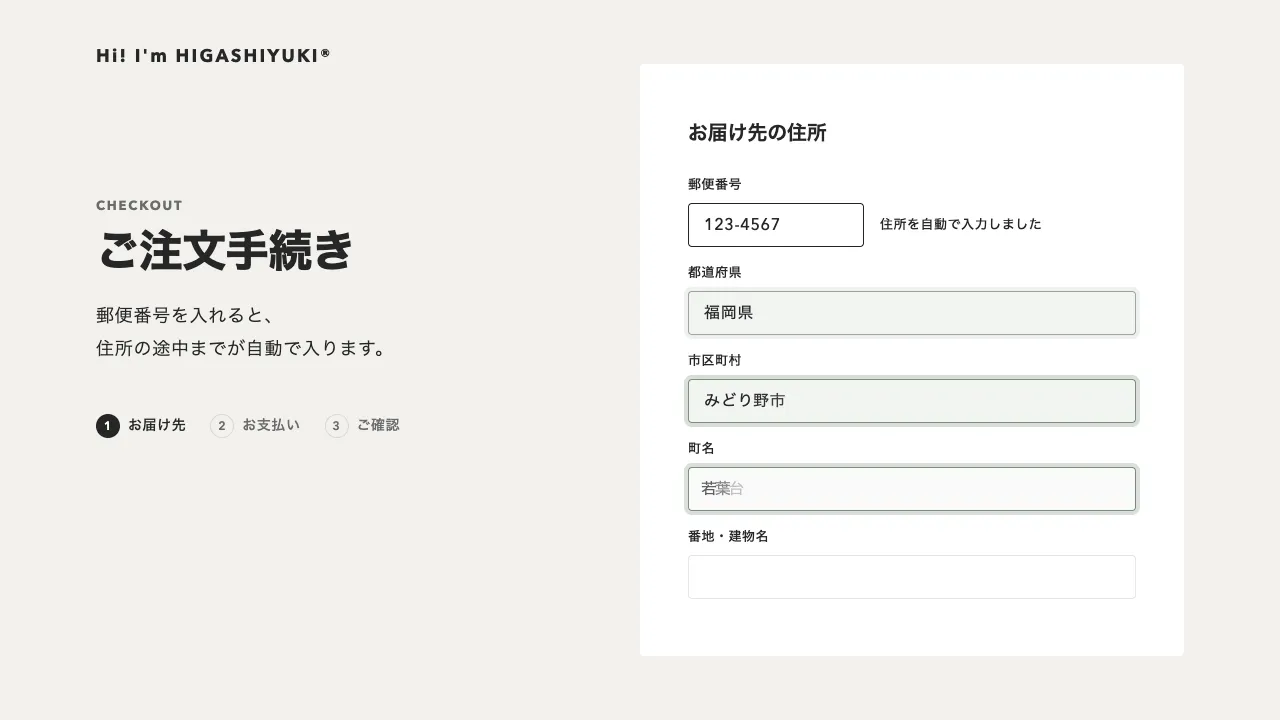
3つの段を横に並べて1本の帯にし、「次へ」で帯ごと1段ぶん左へ滑らせます。戻るときは同じ帯を右へ戻すだけなので、進む動きと戻る動きを別々に書かずに済みます。進捗の点だけを動かすのではなく、入力欄そのものが送られるので、どちらへ動いたかが体で分かります。
帯は0.5秒の power3.inOut で滑らせます。入ってきた段の欄は、滑り始めから0.12秒遅れて、14px下から0.07秒ずつずれて持ち上がります。点をつなぐ線の塗りも帯と同じ時間で伸ばすので、画面の中の動きが1つにまとまって見えます。済んだ段の点は、番号を薄くしながらチェックを0.3秒で描きます。
段を並べた入れ物には overflow: clip を付けます。付けないと、横で控えている段のぶんだけページが横に伸びます。hidden にすると、Tabで画面の外の欄へ焦点が移ったときに、ブラウザが入れ物ごと横にスクロールして段の位置がずれます。読み上げ用に隠した見出しも、位置を持つ段の中に置かないと入れ物に切られず、同じように横へ伸びます。
見えていない段は inert にして、Tabが外の欄へ入らないようにします。段が移ったら最初の欄へ焦点を送り、見えない role="status" の領域に「ステップ2/3」と書いて読み上げます。「次へ」を押した時点で、その段の欄だけをブラウザに確かめさせるので、最後まで進んでから前の段へ戻される、ということが起きません。
つまみは、滑る時間と欄のずれの幅です。ずれを広げると1つずつ置かれていく感じになり、詰めると面ごと入れ替わって見えます。動きを減らす設定では、滑りも点の切り替えもほぼ一瞬で済ませます。申し込み、会員登録、注文や予約の手続きなど、聞くことが多くて1画面に収まらないフォームに向いています。
コード
<!-- 3 段に分けた申し込みフォーム。段は横に並べ、帯ごと滑らせて入れ替える -->
<form class="wizard" action="/apply/" method="post">
  <h2 class="wizard__title">参加のお申し込み</h2>
  <ol class="wizard__steps">
    <li class="wizard__step" data-state="current" aria-current="step">
      <span class="wizard__dot">
        <span class="wizard__num">1</span>
        <svg class="wizard__check" viewBox="0 0 16 16" aria-hidden="true"><path d="M3.2 8.4 6.4 11.6 12.8 4.6" pathLength="1" /></svg>
      </span>
      <span class="wizard__name">お客様情報</span>
    </li>
    <li class="wizard__step" data-state="todo">
      <span class="wizard__dot">
        <span class="wizard__num">2</span>
        <svg class="wizard__check" viewBox="0 0 16 16" aria-hidden="true"><path d="M3.2 8.4 6.4 11.6 12.8 4.6" pathLength="1" /></svg>
      </span>
      <span class="wizard__name">ご住所</span>
    </li>
    <li class="wizard__step" data-state="todo">
      <span class="wizard__dot">
        <span class="wizard__num">3</span>
        <svg class="wizard__check" viewBox="0 0 16 16" aria-hidden="true"><path d="M3.2 8.4 6.4 11.6 12.8 4.6" pathLength="1" /></svg>
      </span>
      <span class="wizard__name">ご確認</span>
    </li>
  </ol>

  <!-- はみ出しは clip で隠す(hidden だと、焦点が外の段へ移ったとき枠ごと横にずれる) -->
  <div class="wizard__viewport">
    <div class="wizard__track">
      <fieldset class="wizard__panel">
        <legend class="wizard__legend">お客様情報</legend>
        <p class="field rise"><label for="wz-name">お名前</label><input id="wz-name" name="name" autocomplete="name" required></p>
        <p class="field rise"><label for="wz-mail">メールアドレス</label><input id="wz-mail" name="email" type="email" autocomplete="email" pattern="[^@\s]+@[^@\s]+\.[^@\s]+" required></p>
      </fieldset>
      <fieldset class="wizard__panel" inert>
        <legend class="wizard__legend">ご住所</legend>
        <p class="field rise"><label for="wz-zip">郵便番号</label><input id="wz-zip" name="zip" inputmode="numeric" autocomplete="postal-code" required></p>
        <p class="field rise"><label for="wz-addr">市区町村・番地</label><input id="wz-addr" name="address" autocomplete="street-address" required></p>
      </fieldset>
      <div class="wizard__panel" inert>
        <h3 class="wizard__legend">ご確認</h3>
        <dl class="review">
          <div class="review__row rise"><dt>お名前</dt><dd data-from="wz-name"></dd></div>
          <div class="review__row rise"><dt>メールアドレス</dt><dd data-from="wz-mail"></dd></div>
          <div class="review__row rise"><dt>ご住所</dt><dd data-from="wz-addr"></dd></div>
        </dl>
      </div>
      <div class="wizard__panel wizard__done" inert>
        <span class="wizard__mark rise"><svg viewBox="0 0 16 16" aria-hidden="true"><path d="M3.2 8.4 6.4 11.6 12.8 4.6" pathLength="1" /></svg></span>
        <h3 class="rise" tabindex="-1">お申し込みが完了しました</h3>
        <p class="rise">確認のメールをお送りしました。</p>
      </div>
    </div>
  </div>

  <p class="wizard__foot">
    <button class="wizard__back" type="button" disabled>戻る</button>
    <button class="wizard__next" type="button" data-first="次へ" data-last="申し込む"><span class="wizard__label">次へ</span></button>
  </p>
  <p class="wizard__status" role="status"></p>
</form>/* 3 段のフォーム。点と線の進み具合は CSS の遷移、段の入れ替えは JS が受け持つ */
.wizard {
--ink: #262626; /* 文字と塗り */
--paper: #ffffff; /* カードと欄の地 */
--mute: #6b6b6b; /* 欄の名前など 16px 未満の補足 */
--line: rgba(38, 38, 38, 0.12); /* 罫線 */
--green: #4f8a64; /* 完了の印 */
--fill: 0; /* 点をつなぐ線の塗り(0〜1。JS が動かす) */
box-sizing: border-box;
max-width: 544px;
margin: 0 auto;
padding: 40px;
border-radius: 4px;
background: var(--paper);
color: var(--ink);
}
.wizard__title { margin: 0; font-size: 24px; font-weight: 700; letter-spacing: -0.01em; }
.wizard__steps { position: relative; display: flex; justify-content: space-between; margin: 32px 0 0; padding: 0; list-style: none; }
.wizard__steps::before, .wizard__steps::after { content: ""; position: absolute; top: 13px; left: 14px; right: 14px; height: 2px; }
.wizard__steps::before { background: var(--line); }
/* 塗りは clip-path で伸ばす(scaleX だと線の端までつぶれる) */
.wizard__steps::after { background: var(--ink); clip-path: inset(0 calc(100% - var(--fill) * 100%) 0 0); }
.wizard__step { display: flex; flex-direction: column; align-items: center; gap: 8px; }
.wizard__step:first-child { align-items: flex-start; }
.wizard__step:last-child { align-items: flex-end; }
.wizard__dot {
position: relative;
display: grid;
place-items: center;
width: 28px;
height: 28px;
border-radius: 50%;
background: var(--paper);
box-shadow: inset 0 0 0 1px var(--line);
color: var(--mute);
font: inherit; font-weight: 700; font-size: 13px; line-height: 1;
transition: background-color 0.25s, box-shadow 0.25s, color 0.25s;
}
.wizard__step[data-state="current"] .wizard__dot,
.wizard__step[data-state="done"] .wizard__dot { background: var(--ink); box-shadow: none; color: var(--paper); }
.wizard__num, .wizard__check { grid-area: 1 / 1; transition: opacity 0.2s; }
.wizard__step[data-state="done"] .wizard__num { opacity: 0; }
.wizard__check { width: 16px; height: 16px; }
/* 線の長さを 1 にしておき、隠す量(dashoffset)を 1 → 0 と縮めて描く */
.wizard__check path, .wizard__mark path {
fill: none; stroke: var(--paper); stroke-width: 2; stroke-linecap: round; stroke-linejoin: round;
stroke-dasharray: 1; stroke-dashoffset: 1; transition: stroke-dashoffset 0.3s;
}
.wizard__step[data-state="done"] .wizard__check path { stroke-dashoffset: 0; }
.wizard__name { color: var(--mute); font-size: 12px; font-weight: 700; letter-spacing: 0.06em; white-space: nowrap; transition: color 0.3s; }
.wizard__step[data-state="current"] .wizard__name, .wizard__step[data-state="done"] .wizard__name { color: var(--ink); }
/* はみ出しは clip(hidden だと、外の段へ焦点が移ったとき枠が横にスクロールする) */
.wizard__viewport { overflow: clip; margin-top: 32px; }
.wizard__track { display: flex; }
.wizard__panel { position: relative; flex: 0 0 100%; min-width: 0; margin: 0; padding: 0; border: 0; background: var(--paper); }
/* 読み上げ用の見出し。位置を持つ段の中に置く(外に出ると枠で切られず、ページが横に伸びる) */
.wizard__legend { position: absolute; width: 1px; height: 1px; overflow: hidden; clip-path: inset(50%); }
.field { margin: 0 0 24px; }
.field label { display: block; margin-bottom: 8px; color: var(--mute); font-size: 13px; font-weight: 600; letter-spacing: 0.06em; }
.field input {
box-sizing: border-box; width: 100%; height: 56px; padding: 0 16px;
border: 1px solid var(--line); border-radius: 4px; background: var(--paper);
color: inherit; font: inherit; font-size: 16px;
}
.field input:focus-visible { border-color: var(--ink); outline: 1px solid var(--ink); outline-offset: 0; }
.review { margin: 0; }
.review__row { display: flex; align-items: center; justify-content: space-between; gap: 16px; height: 56px; border-bottom: 1px solid var(--line); }
.review__row dt { color: var(--mute); font-size: 13px; font-weight: 600; letter-spacing: 0.06em; }
.review__row dd { margin: 0; font-size: 15px; font-weight: 500; }
.wizard__done { display: grid; place-content: center; justify-items: center; padding: 32px 24px; border-radius: 4px; background: var(--ink); color: #eeece6; text-align: center; }
.wizard__mark { display: grid; place-items: center; width: 56px; height: 56px; margin-bottom: 24px; border-radius: 50%; background: var(--green); }
.wizard__mark svg { width: 28px; height: 28px; }
.wizard__mark path { stroke: #ffffff; transition-delay: 0.3s; }
.wizard[data-done] .wizard__mark path { stroke-dashoffset: 0; }
.wizard__done h3 { margin: 0; font-size: 20px; font-weight: 700; }
.wizard__done p { margin: 12px 0 0; color: #a8a6a0; font-size: 14px; }
.wizard__foot { display: flex; justify-content: space-between; gap: 16px; margin: 32px 0 0; }
.wizard__back, .wizard__next { height: 48px; padding: 0 32px; border: 0; border-radius: 999px; font: inherit; font-size: 15px; font-weight: 600; letter-spacing: 0.04em; cursor: pointer; }
.wizard__back { background: none; box-shadow: inset 0 0 0 1px currentColor; color: var(--ink); }
.wizard__back[disabled] { color: #c8c7c3; cursor: default; }
.wizard__next { min-width: 144px; overflow: hidden; background: var(--ink); color: #ffffff; }
.wizard__label { display: block; }
.wizard :focus-visible { outline: 2px solid var(--ink); outline-offset: 4px; }
.wizard__status { position: absolute; width: 1px; height: 1px; overflow: hidden; clip-path: inset(50%); }
/* 動きを減らす設定では、色や線の切り替えもほぼ一瞬にする */
@media (prefers-reduced-motion: reduce) { .wizard * { transition-duration: 0.01s !important; } }
@media (max-width: 480px) { .wizard { padding: 24px 16px; } .wizard__name { font-size: 11px; letter-spacing: 0.04em; } .wizard__back, .wizard__next { padding: 0 20px; } }import { gsap } from "gsap";
// 動きを減らす設定では、ほぼ一瞬で切り替える
const reduce = window.matchMedia("(prefers-reduced-motion: reduce)").matches;
const T = reduce ? 0.02 : 1;
document.querySelectorAll(".wizard").forEach((wizard) => {
const track = wizard.querySelector(".wizard__track");
const panels = [...wizard.querySelectorAll(".wizard__panel")];
const steps = [...wizard.querySelectorAll(".wizard__step")];
const next = wizard.querySelector(".wizard__next");
const label = wizard.querySelector(".wizard__label");
const back = wizard.querySelector(".wizard__back");
const status = wizard.querySelector(".wizard__status");
const last = steps.length - 1;
let step = 0;
// ボタンの文字は、上へ抜いてから下から入れる(同じ場所で重ねると、途中で 2 つの文が重なって読めない)
const swap = (text) => {
if (label.textContent === text) return;
gsap
.timeline()
.to(label, { yPercent: -120, duration: 0.16 * T, ease: "power2.in" })
.add(() => (label.textContent = text))
.fromTo(label, { yPercent: 120 }, { yPercent: 0, duration: 0.16 * T, ease: "power2.out" });
};
const go = (to) => {
step = to;
gsap.to(track, { xPercent: -100 * to, duration: 0.5 * T, ease: "power3.inOut" });
gsap.to(wizard, { "--fill": Math.min(to, last) / last, duration: 0.5 * T, ease: "power3.inOut" });
// 入ってきた段の中身は、下から順に持ち上げる
gsap.fromTo(
panels[to].querySelectorAll(".rise"),
{ y: 14 },
{ y: 0, duration: 0.5 * T, stagger: 0.07 * T, delay: 0.12 * T, ease: "power3.out" }
);
steps.forEach((li, i) => {
li.dataset.state = i < to ? "done" : i === to ? "current" : "todo";
li.setAttribute("aria-current", i === to ? "step" : "false");
});
// 見えていない段は inert にして、Tab で外の欄へ移れないようにする
panels.forEach((panel, i) => panel.toggleAttribute("inert", i !== to));
back.disabled = to === 0;
next.hidden = to > last;
back.hidden = to > last;
wizard.toggleAttribute("data-done", to > last);
swap(to === last ? next.dataset.last : next.dataset.first);
// 確認の段には、打ち込んだ値を並べる
panels[to].querySelectorAll("[data-from]").forEach((cell) => {
cell.textContent = wizard.querySelector(`#${cell.dataset.from}`).value;
});
const name = steps[to] ? steps[to].querySelector(".wizard__name").textContent : "";
status.textContent = to > last ? "お申し込みが完了しました" : `ステップ${to + 1}/${steps.length}:${name}`;
panels[to].querySelector("input, h3")?.focus({ preventScroll: true });
};
next.addEventListener("click", () => {
// その段の欄がそろっているかを、ブラウザの検証に見てもらう
const bad = [...panels[step].querySelectorAll("input")].find((input) => !input.reportValidity());
if (bad) return;
if (step < last) go(step + 1);
else wizard.requestSubmit();
});
back.addEventListener("click", () => step > 0 && go(step - 1));
// 実際は、ここで fetch して、返事が返ってきてから完了の段へ送る
wizard.addEventListener("submit", (event) => {
event.preventDefault();
go(last + 1);
});
});