デモ
デモを読み込めませんでした。
仕様
- 用途
- カーソル
- 動作
- DOM
- 種類
- レシピ
- 動作確認
- three 0.186.0・gsap 3.15.0
- 公開日
しくみと調整
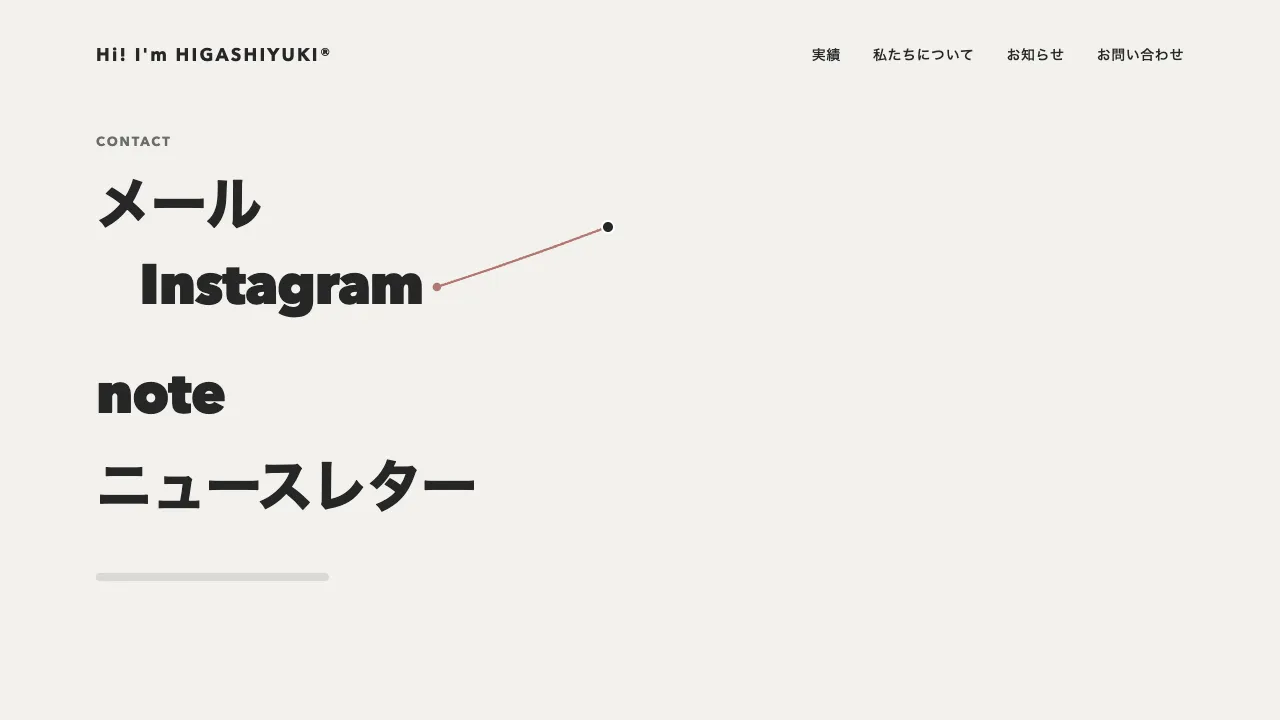
縦と横の 1px の線を、ヒーローの全面に重ねた層に置き、ポインタが動くたびに線と座標の札を動かします。線はヒーローの幅と高さいっぱいの長さで用意しておき、見える長さを clip-path の inset で決めて、交点から上下左右へ同じだけ開きます。ヒーローに入ると交点から端まで伸び、出ると交点へ縮みます。札の数字は、十字の今の位置をヒーローの左上からの px で 4 桁にそろえて出すので、動いているあいだは数字が回って見えます。
十字は 0.3 秒、札は 0.55 秒で追いつくように、どちらも quickTo で追わせています。遅れに差があるので、動かすと札が十字から離れてたなびき、止まると交点の右下 16px に戻って寄り添います。線が伸びるのは 0.8 秒の power3.out で、最初の一瞬で画面の端まで届き、縮むときは 0.45 秒の power2.in で交点へ吸い込まれます。
札の数字は tabular-nums で等幅にします。等幅でないと、数字が変わるたびに札の幅が揺れ、右端と下端で札を交点の反対側へ回す判定まで震えます。線と札の層には pointer-events の none を付け、下のリンクや画像へポインタを通します。本物のカーソルを隠すのは、十字を出したヒーローの中だけです。
指で触る端末ではつながず、本物のカーソルのままにします。キーボードで中のリンクへ移ったときは、そのリンクの中央に十字を合わせて伸ばします。動きを減らす設定では、遅れと伸びる動きを無くして、その場に十字と札を出します。
つまみは、線の濃さ、二つの追いつく時間、札を離す量です。線を罫線ほど淡くすると図面の補助線のように静かになり、濃くすると照準のような張り詰めた印象になります。輪や点が追いかける独自カーソルと違い、画面の縦横の位置そのものを見せるので、設計事務所や写真家のポートフォリオ、寸法や配置を見せたいプロダクトのヒーローに向いています。
コード
<section class="crosshair-hero" aria-labelledby="crosshair-hero-title">
  <div class="crosshair-hero__text">
    <p class="crosshair-hero__eyebrow">Architecture</p>
    <h1 class="crosshair-hero__title" id="crosshair-hero-title">暮らしに合わせて、<br>設計する。</h1>
    <p class="crosshair-hero__lead">ここに説明文が入ります。</p>
    <a class="crosshair-hero__link" href="/projects/">作品を見る</a>
  </div>
  <img class="crosshair-hero__image" src="/img/house-itoshima.jpg" alt="白い箱が張り出した平屋の住宅の外観" width="960" height="960">

  <!-- 十字の線と座標の札。飾りなので読み上げから外す -->
  <div class="crosshair" aria-hidden="true">
    <span class="crosshair__line crosshair__line--v"></span>
    <span class="crosshair__line crosshair__line--h"></span>
    <span class="crosshair__box"></span>
    <span class="crosshair__tag"><span>X 0000</span><span>Y 0000</span></span>
  </div>
</section>.crosshair-hero {
--bg: #f2f1ed;
--ink: #262626;
--mute: #6b6b6b;
--line: rgba(38, 38, 38, 0.72); /* 十字の線。写真の上でも見える濃さ */
position: relative;
display: grid;
grid-template-columns: 1fr minmax(0, 480px);
align-items: center;
gap: 48px;
min-height: 100vh;
box-sizing: border-box;
padding: 96px clamp(24px, 7.5vw, 96px);
overflow: hidden;
background: var(--bg);
color: var(--ink);
}
.crosshair-hero__eyebrow {
margin: 0 0 24px;
color: var(--mute);
font-size: 13px;
font-weight: 700;
letter-spacing: 0.14em;
text-transform: uppercase;
}
.crosshair-hero__title {
margin: 0;
font-size: clamp(32px, 5vw, 64px);
font-weight: 800;
line-height: 1.05;
letter-spacing: -0.02em;
word-break: keep-all; /* 和文の見出しを語の途中で折らない */
}
.crosshair-hero__lead {
margin: 24px 0 32px;
font-size: 18px;
line-height: 1.8;
letter-spacing: 0.04em;
word-break: auto-phrase;
}
.crosshair-hero__link {
display: inline-flex;
align-items: center;
height: 48px;
padding: 0 32px;
border: 1px solid var(--ink);
border-radius: 999px;
color: var(--ink);
font-size: 14px;
font-weight: 600;
letter-spacing: 0.04em;
text-decoration: none;
}
.crosshair-hero__link:focus-visible { outline: 2px solid var(--ink); outline-offset: 4px; }
.crosshair-hero__image { width: 100%; height: auto; aspect-ratio: 1; object-fit: cover; border-radius: 4px; }
@media (max-width: 767px) {
.crosshair-hero { grid-template-columns: 1fr; }
}
/* 下のリンクを押せるよう、十字はポインタを通す。JS がつないだときだけ出し、本物のカーソルを隠す */
.crosshair { position: absolute; inset: 0; display: none; pointer-events: none; }
.has-crosshair .crosshair { display: block; }
.has-crosshair, .has-crosshair a { cursor: none; }
.crosshair > * { position: absolute; left: 0; top: 0; }
.crosshair__line { background: var(--line); }
.crosshair__line--v { width: 1px; height: 100%; }
.crosshair__line--h { width: 100%; height: 1px; }
/* 交点の小さな四角。transform で交点に置くので、大きさの半分だけ戻す */
.crosshair__box { width: 11px; height: 11px; margin: -5px 0 0 -5px; box-sizing: border-box; border: 1px solid var(--ink); background: var(--bg); }
/* 数字は等幅にする。幅が変わると、札が端で回り込む判定まで揺れる */
.crosshair__tag {
display: flex;
gap: 12px;
align-items: center;
height: 28px;
padding: 0 10px;
border-radius: 2px;
background: var(--ink);
color: #fff;
font-size: 13px;
font-weight: 600;
letter-spacing: 0.04em;
font-variant-numeric: tabular-nums;
white-space: nowrap;
}import { gsap } from "gsap";
// 指で触る端末にはポインタが無いので、十字は出さず本物のカーソルのままにする
const canHover = window.matchMedia("(hover: hover) and (pointer: fine)").matches;
const reduceMotion = window.matchMedia("(prefers-reduced-motion: reduce)").matches;
const digits = (value) => String(Math.max(0, Math.round(value))).padStart(4, "0");
document.querySelectorAll(".crosshair-hero").forEach((hero) => {
const cross = hero.querySelector(".crosshair");
if (!canHover || !cross) return;
const [vline, hline] = cross.querySelectorAll(".crosshair__line");
const box = cross.querySelector(".crosshair__box");
const tag = cross.querySelector(".crosshair__tag");
const [textX, textY] = tag.children;
hero.classList.add("has-crosshair");
const pos = { x: 0, y: 0, reach: 0 }; // 十字の位置と伸び具合(0〜1)
const spot = { x: 0, y: 0, show: 0 }; // 札の位置と開き具合(0〜1)
let size = hero.getBoundingClientRect();
// 線の長さは clip-path で決める。交点から上下左右へ同じ長さだけ開く
const render = () => {
const { width, height } = size;
const r = pos.reach * Math.hypot(width, height);
vline.style.transform = `translateX(${pos.x}px)`;
vline.style.clipPath = `inset(${Math.max(0, pos.y - r)}px 0 ${Math.max(0, height - pos.y - r)}px)`;
hline.style.transform = `translateY(${pos.y}px)`;
hline.style.clipPath = `inset(0 ${Math.max(0, width - pos.x - r)}px 0 ${Math.max(0, pos.x - r)}px)`;
box.style.transform = `translate(${pos.x}px, ${pos.y}px)`;
box.style.opacity = pos.reach > 0.02 ? 1 : 0;
tag.style.transform = `translate(${spot.x}px, ${spot.y}px)`;
tag.style.clipPath = `inset(0 ${(1 - spot.show) * 100}% 0 0)`;
textX.textContent = `X ${digits(pos.x)}`;
textY.textContent = `Y ${digits(pos.y)}`;
};
// 札を十字より遅らせる。動きを減らす設定では遅れずに置く(quickTo は duration が 0 だと値が動かない)
const chase = (target, prop, duration) =>
reduceMotion
? (value) => {
target[prop] = value;
render();
}
: gsap.quickTo(target, prop, { duration, ease: "power3", onUpdate: render });
const lineX = chase(pos, "x", 0.3);
const lineY = chase(pos, "y", 0.3);
const tagX = chase(spot, "x", 0.55);
const tagY = chase(spot, "y", 0.55);
// 札は交点の右下。右端・下端に近いときは反対側へ回す。jump なら追わずにその場へ置く
const aim = (x, y, jump) => {
const tx = x + 16 + tag.offsetWidth > size.width - 24 ? x - 16 - tag.offsetWidth : x + 16;
const ty = y + 16 + tag.offsetHeight > size.height - 24 ? y - 16 - tag.offsetHeight : y + 16;
lineX(x, jump ? x : undefined);
lineY(y, jump ? y : undefined);
tagX(tx, jump ? tx : undefined);
tagY(ty, jump ? ty : undefined);
};
const toggle = (on) => {
const ease = on ? "power3.out" : "power2.in";
gsap.to(pos, { reach: on ? 1 : 0, duration: reduceMotion ? 0 : on ? 0.8 : 0.45, ease, overwrite: "auto", onUpdate: render });
gsap.to(spot, { show: on ? 1 : 0, duration: reduceMotion ? 0 : 0.3, ease, overwrite: "auto", onUpdate: render });
};
const local = (event) => {
size = hero.getBoundingClientRect();
return [event.clientX - size.left, event.clientY - size.top];
};
hero.addEventListener("pointerenter", (event) => {
if (event.pointerType === "touch") return;
const [x, y] = local(event);
aim(x, y, pos.reach < 0.02); // 縮みきっていれば、入った位置から伸ばす
toggle(true);
});
hero.addEventListener("pointermove", (event) => {
if (event.pointerType !== "touch") aim(...local(event));
});
hero.addEventListener("pointerleave", () => toggle(false));
// キーボードで中のリンクに移ったときは、その右隣に十字を合わせる(交点の四角で文字を隠さない)
hero.addEventListener("focusin", (event) => {
if (!event.target.matches(":focus-visible")) return;
size = hero.getBoundingClientRect();
const r = event.target.getBoundingClientRect();
aim(r.right + 16 - size.left, r.top + r.height / 2 - size.top, pos.reach < 0.02);
toggle(true);
});
hero.addEventListener("focusout", () => hero.matches(":hover") || toggle(false));
window.addEventListener("resize", () => {
size = hero.getBoundingClientRect();
render();
});
render();
});