デモ
デモを読み込めませんでした。
仕様
- 用途
- オーバーレイ
- 動作
- DOM
- 種類
- レシピ
- 動作確認
- three 0.186.0・gsap 3.15.0
- 公開日
しくみと調整
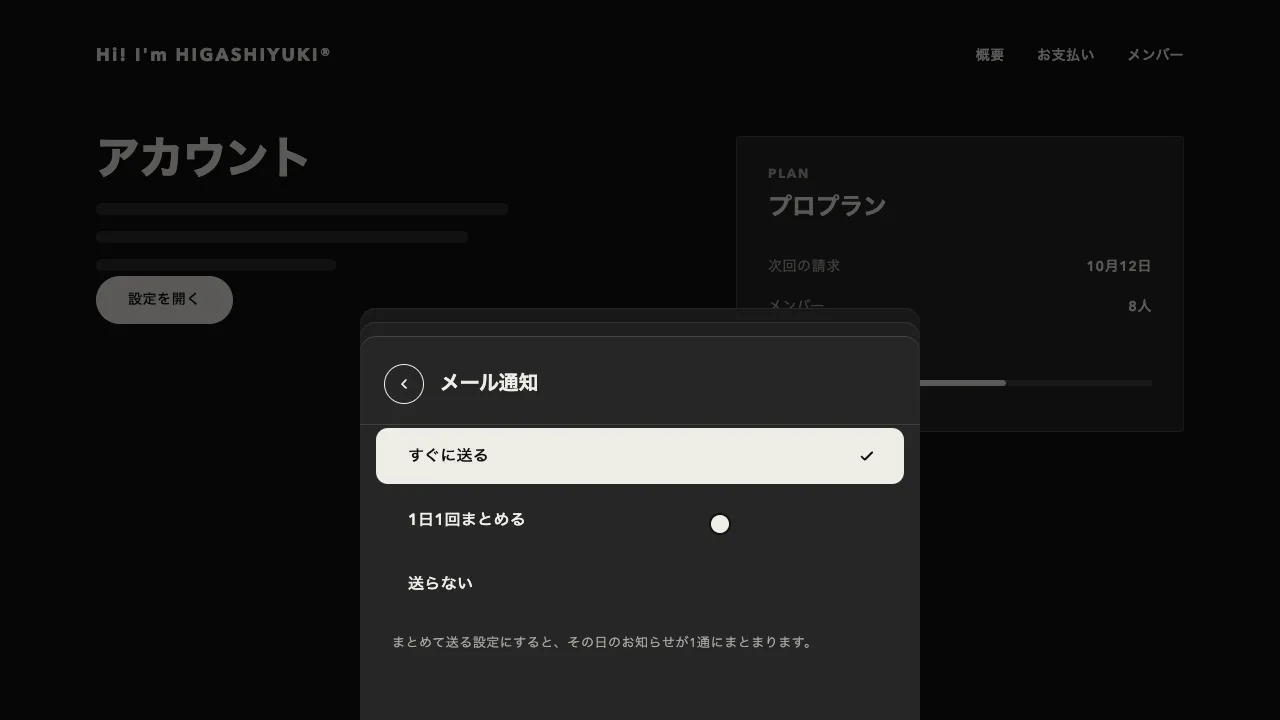
通知が来るたびに、前にあったものを 1 枚ずつ奥へ下げて重ねます。奥の通知は少し上へずれて小さくなり、中身を隠して上の縁だけをのぞかせます。見せるのは 3 枚までで、それより古いものは奥で消えます。束にカーソルを重ねると縦に広がって全部読め、離れると重なり直します。
奥へ 1 枚下がるごとに、上へ 12px ずらして 5% 縮めます。縮める基準(transformOrigin)を上の中央にすると、奥の通知は上の縁だけが同じ幅でのぞきます。広げるときは、通知の高さと間の 12px を積んだ位置へ、縮みを戻しながら 0.45 秒(power3.out)で動かします。
広げた通知のあいだには隙間があるので、そのままだと上の通知へ移る途中でホバーが切れ、束が閉じてしまいます。各通知の ::after を上の隙間に敷いて、ひとつながりの面にします。通知の高さもそろえておきます。高さが違うと、束ねたときにのぞく縁の幅がばらつきます。
通知は 5 秒で消えますが、重ねているあいだとキーボードの焦点が中にあるあいだは、消えるまでの時間(delayedCall)を止めます。置き場所は aria-live の領域として先にページへ置き、通知はその中へ足します。足すときは opacity だけで隠します。visibility で隠すと、出てくる前の文が読み上げに届きません。
のぞく高さ・縮める割合・見せる枚数で、束の厚みが変わります。動きを減らす設定では、出入りと重ね替えをほぼ一瞬にし、読む時間は残します。デプロイ・保存・コメントなど、通知が重なりやすい管理画面やアプリに向いています。
コード
<button class="toast-trigger" type="button">新規デプロイ</button>

<!-- 置き場所は最初からページに置き、通知はこの中へ足す(領域ごと後から足すと、読み上げられない) -->
<section class="toasts" aria-label="通知">
  <ol class="toasts__list" aria-live="polite"></ol>
</section>

<template id="toast-template">
  <li class="toast">
    <div class="toast__content">
      <span class="toast__icon" aria-hidden="true">
        <svg viewBox="0 0 24 24" focusable="false">
          <path d="M6 16.5h12l-1.5-2.2V10a4.5 4.5 0 0 0-9 0v4.3z" />
          <path d="M10.5 19.5a1.5 1.5 0 0 0 3 0" />
        </svg>
      </span>
      <p class="toast__text">
        <b class="toast__title"></b>
        <span class="toast__body"></span>
      </p>
      <button class="toast__close" type="button" aria-label="通知を閉じる">×</button>
    </div>
  </li>
</template>.toasts {
--ink: #eeece6; /* 文字と線 */
--surface: #262626; /* 通知の面 */
--mute: #a8a6a0; /* 補足の文字 */
--line: rgba(238, 236, 230, 0.14); /* 縁 */
--height: 72px; /* 高さをそろえると、束ねたとき奥の縁が同じ幅でのぞく */
--gap: 12px; /* 広げたときの間 */
position: fixed;
z-index: 100;
right: 24px;
bottom: 24px;
width: min(384px, calc(100vw - 32px));
}
.toasts__list { margin: 0; padding: 0; list-style: none; }
/* 通知はどれも下端をそろえて重ね、縮めるときは上の縁を基準にする(奥の 1 枚は上の縁だけがのぞく) */
.toast {
position: absolute;
left: 0;
right: 0;
bottom: 0;
height: var(--height);
border-radius: 4px;
box-shadow: inset 0 0 0 1px var(--line);
background-color: var(--surface);
color: var(--ink);
transform-origin: 50% 0;
}
/* 広げたとき、上の通知との間を埋める。無いと、間をまたぐ一瞬にホバーが切れて束が閉じる */
.toast::after { content: ""; position: absolute; left: 0; right: 0; bottom: 100%; height: var(--gap); }
.toast__content {
display: flex;
align-items: center;
gap: 12px;
height: 100%;
box-sizing: border-box;
padding: 0 8px 0 16px;
}
/* 色の無いアイコンは、文字の色の線の丸 */
.toast__icon {
display: grid;
place-items: center;
flex: none;
width: 40px;
height: 40px;
border-radius: 50%;
box-shadow: inset 0 0 0 1px var(--ink);
}
/* 24 グリッドを 20px で描くので、線幅 2.4 で 2px になる */
.toast__icon svg { width: 20px; height: 20px; fill: none; stroke: currentColor; stroke-width: 2.4; stroke-linecap: round; stroke-linejoin: round; }
.toast__text { flex: 1; min-width: 0; margin: 0; letter-spacing: 0.04em; }
.toast__title, .toast__body { display: block; overflow: hidden; white-space: nowrap; text-overflow: ellipsis; }
.toast__title { font-size: 14px; line-height: 1.3; }
.toast__body { margin-top: 4px; color: var(--mute); font-size: 13px; line-height: 1.3; }
.toast__close {
align-self: flex-start;
flex: none;
width: 32px;
height: 32px;
margin-top: 8px;
padding: 0;
border: 0;
background: none;
color: var(--mute);
font: inherit;
font-size: 20px;
line-height: 1;
cursor: pointer;
}
.toast__close:focus-visible { outline: 2px solid var(--ink); outline-offset: -2px; }
/* 通知を出すボタン(主ボタン) */
.toast-trigger {
height: 48px;
padding: 0 32px;
border: 0;
border-radius: 999px;
background-color: #262626;
color: #ffffff;
font: inherit;
font-size: 15px;
font-weight: 600;
letter-spacing: 0.04em;
cursor: pointer;
}
.toast-trigger:focus-visible { outline: 2px solid #262626; outline-offset: 4px; }import { gsap } from "gsap";
const reduceMotion = window.matchMedia("(prefers-reduced-motion: reduce)").matches;
const M = reduceMotion ? 0.02 : 1; // 動きを減らす設定では、出入りと重ね替えをほぼ一瞬にする(読む時間は残す)
const SHOW = 5; // 消えるまでの秒数(重ねている間と、中に焦点がある間は止まる)
const PEEK = 12; // 束ねたとき、奥の 1 枚が上にのぞく高さ(px)
const SHRINK = 0.05; // 奥へ 1 枚下がるごとに縮める割合
const VISIBLE = 3; // 見せる枚数。それより古いものは奥で消える
const region = document.querySelector(".toasts");
const list = region.querySelector(".toasts__list");
const template = document.getElementById("toast-template");
const toasts = []; // 新しいものが先頭
let expanded = false;
// 並びの番号を奥行きにして、束ねた形か広げた形へ動かす
function layout() {
const gap = parseFloat(getComputedStyle(region).getPropertyValue("--gap"));
let top = 0; // 広げたときの、この通知の位置(上へ積む)
toasts.forEach((toast, depth) => {
gsap.to(toast.el, {
y: expanded ? top : -depth * PEEK,
scale: expanded ? 1 : 1 - depth * SHRINK,
autoAlpha: depth < VISIBLE ? 1 : 0,
duration: 0.45 * M,
ease: "power3.out",
overwrite: "auto",
});
// 束ねている間は奥の中身を隠し、縁だけを重ねて見せる
gsap.to(toast.content, { opacity: expanded || depth === 0 ? 1 : 0, duration: 0.2 * M, overwrite: "auto" });
top -= toast.el.offsetHeight + gap;
});
}
function dismiss(toast) {
const i = toasts.indexOf(toast);
if (i < 0) return;
toasts.splice(i, 1);
toast.timer.kill();
// 消える通知に焦点を残さない。キーボードで閉じたなら隣の通知(並びで次、無ければ前)へ移し、マウスなら外す(束が閉じられるように)
const focused = toast.el.querySelector(":focus");
const next = toasts[i - 1] ?? toasts[i];
if (focused?.matches(":focus-visible") && next) next.close.focus();
else focused?.blur();
gsap.to(toast.el, { y: "+=18", autoAlpha: 0, duration: 0.35 * M, ease: "power2.in", overwrite: "auto", onComplete: () => toast.el.remove() });
layout();
}
export function notify(title, body) {
const el = template.content.firstElementChild.cloneNode(true);
el.querySelector(".toast__title").textContent = title;
el.querySelector(".toast__body").textContent = body;
const toast = { el, content: el.querySelector(".toast__content"), close: el.querySelector(".toast__close") };
toast.close.addEventListener("click", () => dismiss(toast));
// 後ろに足すと重なりの手前に来て、読み上げにも流れる。隠すのは opacity だけにする(visibility で隠すと読まれない)
list.append(el);
gsap.set(el, { y: el.offsetHeight + 24, opacity: 0 }); // 下の外から来る
toasts.unshift(toast);
toast.timer = gsap.delayedCall(SHOW, () => dismiss(toast));
if (expanded) toast.timer.pause();
layout();
}
function setExpanded(next) {
if (expanded === next) return;
expanded = next;
toasts.forEach((toast) => (next ? toast.timer.pause() : toast.timer.resume()));
layout();
}
// 重ねている間と、キーボードの焦点が中にある間は広げて、消えるまでの時間を止める
region.addEventListener("pointerenter", () => setExpanded(true));
region.addEventListener("pointerleave", () => setExpanded(Boolean(region.querySelector(":focus-visible"))));
region.addEventListener("focusin", () => setExpanded(true));
region.addEventListener("focusout", (event) => setExpanded(region.contains(event.relatedTarget) || region.matches(":hover")));
// 試しに通知を出すボタン。案件では、知らせたいときに notify(見出し, 本文) を呼ぶ
const samples = [
["デプロイが完了しました", "relay-web・main・42秒でビルド"],
["森さんがコメントしました", "「よさそうです。マージしますね」"],
["転送量が80%に達しました", "6日後にリセットされます"],
["ログを書き出しました", "build-218.log・1.2MB"],
];
let sent = 0;
document.querySelectorAll(".toast-trigger").forEach((button) => {
button.addEventListener("click", () => notify(...samples[sent++ % samples.length]));
});