デモ
デモを読み込めませんでした。
仕様
- 用途
- オーバーレイ
- 動作
- DOM
- 種類
- レシピ
- 動作確認
- three 0.186.0・gsap 3.15.0
- 公開日
しくみと調整
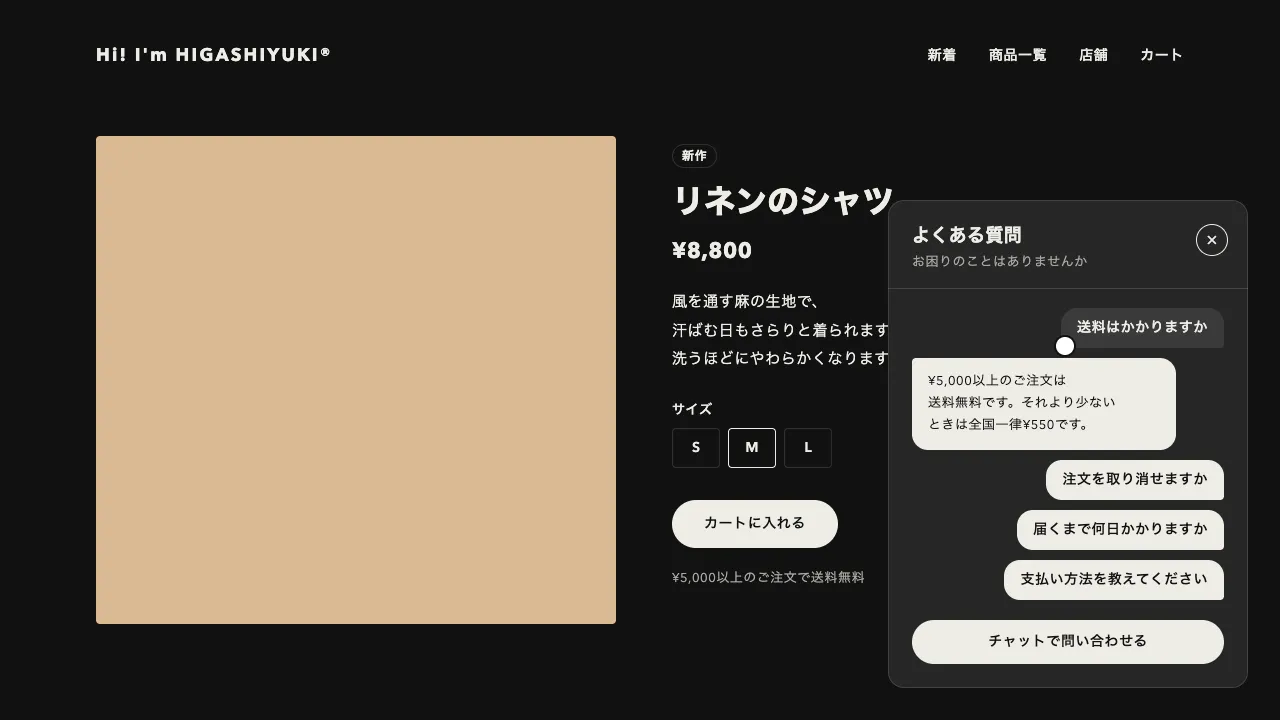
右下の丸いボタンを押すと、ボタンの中心から円が広がるようにしてチャットのウィンドウが開きます。少し間を置いて「入力中」の3つの点が揺れ、それが受付のメッセージに替わると、下に選択肢のボタンが順に並びます。選択肢を押せば、そのボタンが黒く反転して右に自分の吹き出しが入り、また点を挟んで返事が届きます。
開き方は clip-path の circle() です。円の中心をボタンの中心に置き、半径だけを0.55秒の power3.inOut で広げています。scale で拡大するやり方だと、文字や角の丸み、細い縁まで一緒に伸び縮みしてしまいます。円で切り抜くだけなら、中身は最初から完成した大きさのままで、ボタンから広がったように見えます。半径は0からではなく、ボタンの中心からウィンドウの下端までの距離から始めました。0から広げると、円がウィンドウに届くまで何も起きない間ができるからです。
点は0.8秒見せてから吹き出しに差し替えます。この間がないと、押した瞬間に文が全部並んでしまい、相手が答えている感じになりません。選べるのは1回だけで、選んだあとのボタンは disabled ではなく aria-disabled で止めています。disabled だと、押したボタンからフォーカスが外れてしまいます。
ウィンドウはモーダルにせず、ページを読みながら開いておけるようにしました。開くとフォーカスはウィンドウへ移り、Esc で閉じるとボタンへ戻ります。メッセージの一覧は aria-live にしてあるので、届いた文はスクリーンリーダーで読み上げられ、揺れる点は aria-hidden で読ませません。美容室や歯科医院のように、予約の前に小さな質問が多く寄せられる店のサイトに合う部品です。
コード
<!-- 右下に固定するチャット。文言はすべてここに書き、script.js は順番と動きだけを受け持つ -->
<div class="chat-widget">
  <section class="chat-widget__window" id="chat-window" role="dialog" aria-labelledby="chat-title" tabindex="-1" hidden>
    <div class="chat-widget__head">
      <h2 class="chat-widget__title" id="chat-title">ご予約・お問い合わせ</h2>
      <p class="chat-widget__hours">受付 10:00〜19:00</p>
    </div>
    <ol class="chat-widget__log" aria-live="polite">
      <!-- 開いたときに「入力中」の点を挟んで順に表示する -->
      <li class="chat-widget__bubble" hidden>こんにちは。<br>ご予約やメニューについて、<br>お気軽にどうぞ。</li>
      <li class="chat-widget__choices" hidden>
        <button type="button" data-reply="ご希望の日にちを選んでください。">予約したい</button>
        <button type="button" data-reply="カットは¥5,500からです。">料金を知りたい</button>
        <button type="button" data-reply="駅の東口から歩いて3分です。">アクセス</button>
      </li>
    </ol>
    <form class="chat-widget__form" data-reply="スタッフから折り返しご連絡します。">
      <input class="chat-widget__input" name="message" aria-label="メッセージ" placeholder="メッセージを入力" autocomplete="off">
      <button class="chat-widget__send" type="submit" aria-label="送信">
        <svg viewBox="0 0 24 24" aria-hidden="true"><path d="M5 12h13M13 6l6 6-6 6" /></svg>
      </button>
    </form>
  </section>

  <button class="chat-widget__launcher" type="button" aria-expanded="false" aria-controls="chat-window" aria-label="チャットで問い合わせる">
    <svg class="chat-widget__icon" viewBox="0 0 24 24" aria-hidden="true"><path d="M5 5.5h14a1.5 1.5 0 0 1 1.5 1.5v8a1.5 1.5 0 0 1-1.5 1.5H10l-4.5 3.5V16.5H5A1.5 1.5 0 0 1 3.5 15V7A1.5 1.5 0 0 1 5 5.5z" /></svg>
    <svg class="chat-widget__icon chat-widget__icon--close" viewBox="0 0 24 24" aria-hidden="true"><path d="M7 7l10 10M17 7 7 17" /></svg>
  </button>
</div>.chat-widget {
--bg: #f2f1ed;
--surface: #ffffff;
--ink: #262626;
--mute: #6b6b6b;
--line: rgba(38, 38, 38, 0.12);
--edge: 32px;
--ball: 56px;
position: fixed;
right: var(--edge);
bottom: var(--edge);
z-index: 100;
color: var(--ink);
}
.chat-widget [hidden] { display: none !important; }
/* ウィンドウはボタンの上に置き、clip-path の円で開く(拡大しないので、文字も角の丸みも最初から完成の大きさ) */
.chat-widget__window {
position: absolute;
right: 0;
bottom: calc(var(--ball) + 16px);
display: flex;
flex-direction: column;
width: min(360px, calc(100vw - 2 * var(--edge)));
height: min(440px, calc(100dvh - var(--ball) - 3 * var(--edge)));
border-radius: 16px;
background: var(--surface);
box-shadow: inset 0 0 0 1px var(--line);
overflow: hidden;
outline: none;
}
.chat-widget__head { padding: 20px 20px 16px; border-bottom: 1px solid var(--line); }
.chat-widget__title { margin: 0; font-size: 15px; font-weight: 700; letter-spacing: 0.04em; line-height: 1; }
.chat-widget__hours { margin: 8px 0 0; color: var(--mute); font-size: 12px; font-weight: 600; letter-spacing: 0.06em; line-height: 1; }
.chat-widget__log { display: flex; flex: 1; flex-direction: column; align-items: flex-start; gap: 16px; margin: 0; padding: 16px; overflow-y: auto; list-style: none; }
/* 相手の吹き出しは背景色、自分の吹き出しはブラックで右に寄せる */
.chat-widget__bubble { max-width: 80%; padding: 10px 14px; border-radius: 4px 16px 16px 16px; background: var(--bg); font-size: 14px; line-height: 1.6; letter-spacing: 0.04em; }
.chat-widget__bubble--mine { align-self: flex-end; border-radius: 16px 16px 4px 16px; background: var(--ink); color: var(--surface); }
.chat-widget__typing { display: flex; gap: 5px; padding: 14px 16px; }
.chat-widget__typing span { width: 7px; height: 7px; border-radius: 50%; background: var(--mute); opacity: 0.35; }
.chat-widget__choices { display: flex; flex-wrap: wrap; gap: 8px; }
.chat-widget__choices button {
height: 34px;
padding: 0 16px;
border: 0;
border-radius: 999px;
background: var(--surface);
box-shadow: inset 0 0 0 1px var(--ink);
color: var(--ink);
font: inherit;
font-size: 13px;
font-weight: 600;
letter-spacing: 0.04em;
cursor: pointer;
transition: background-color 0.2s, color 0.2s, opacity 0.2s;
}
.chat-widget__choices button[aria-pressed="true"] { background: var(--ink); color: var(--surface); }
.chat-widget__choices button[aria-disabled="true"] { cursor: default; }
.chat-widget__choices button[aria-pressed="false"] { opacity: 0.45; }
.chat-widget__form { position: relative; margin: 0 16px 16px; }
.chat-widget__input { box-sizing: border-box; width: 100%; height: 44px; padding: 0 52px 0 18px; border: 0; border-radius: 999px; background: none; box-shadow: inset 0 0 0 1px var(--line); color: var(--ink); font: inherit; font-size: 13px; }
.chat-widget__input:focus { outline: none; box-shadow: inset 0 0 0 1px var(--ink); }
.chat-widget__send { position: absolute; top: 4px; right: 4px; display: grid; place-items: center; width: 36px; height: 36px; padding: 0; border: 0; border-radius: 50%; background: var(--line); color: var(--ink); cursor: pointer; }
.chat-widget__send svg { width: 18px; height: 18px; fill: none; stroke: currentColor; stroke-width: 2.4; stroke-linecap: round; stroke-linejoin: round; }
.chat-widget__launcher { position: relative; display: grid; place-items: center; width: var(--ball); height: var(--ball); padding: 0; border: 0; border-radius: 50%; background: var(--ink); color: var(--surface); cursor: pointer; }
.chat-widget__icon { grid-area: 1 / 1; width: 24px; height: 24px; fill: none; stroke: currentColor; stroke-width: 2; stroke-linecap: round; stroke-linejoin: round; transition: opacity 0.35s, rotate 0.35s; }
.chat-widget__icon--close, .chat-widget__launcher[aria-expanded="true"] .chat-widget__icon { opacity: 0; rotate: 45deg; }
.chat-widget__launcher[aria-expanded="true"] .chat-widget__icon:first-child { rotate: -45deg; }
.chat-widget__launcher[aria-expanded="true"] .chat-widget__icon--close { opacity: 1; rotate: 0deg; }
.chat-widget button:focus-visible { outline: 2px solid var(--ink); outline-offset: 3px; }
@media (prefers-reduced-motion: reduce) {
.chat-widget__icon, .chat-widget__choices button { transition: none; }
}import { gsap } from "gsap";
const reduceMotion = window.matchMedia("(prefers-reduced-motion: reduce)").matches;
const TYPING = reduceMotion ? 0 : 0.8; // 「入力中」の点を見せる長さ(秒)
document.querySelectorAll(".chat-widget").forEach((widget) => {
const launcher = widget.querySelector(".chat-widget__launcher");
const win = widget.querySelector(".chat-widget__window");
const log = widget.querySelector(".chat-widget__log");
const form = widget.querySelector(".chat-widget__form");
const [greeting, choices] = log.children;
let started = false, clip = null, queue = null;
// 円の中心はボタンの中心(ウィンドウの左上から見た位置)。開ききる半径は、そこからいちばん遠い角まで
const circle = (open) => {
const w = win.getBoundingClientRect(), b = launcher.getBoundingClientRect();
const x = b.left + b.width / 2 - w.left, y = b.top + b.height / 2 - w.top;
return `circle(${open ? Math.ceil(Math.hypot(x, y)) + 2 : Math.max(0, y - w.height)}px at ${x}px ${y}px)`;
};
// 吹き出しを下から浮かべて表示し、ログの末尾までスクロールする(まだ入っていない吹き出しは末尾に足す)
const reveal = (el) => {
if (!el.isConnected) log.append(el);
el.hidden = false;
log.scrollTop = log.scrollHeight;
if (!reduceMotion) gsap.fromTo(el, { y: 10, opacity: 0 }, { y: 0, opacity: 1, duration: 0.35, ease: "power3.out" });
};
const bubble = (text, mine) => {
const li = document.createElement("li");
li.className = `chat-widget__bubble${mine ? " chat-widget__bubble--mine" : ""}`;
li.textContent = text;
return li;
};
// 「入力中」の点を挟んで、相手のメッセージを届ける。点はスクリーンリーダーには読ませない
const answer = (el, delay = 0.45) => {
const typing = document.createElement("li");
typing.className = "chat-widget__bubble chat-widget__typing";
typing.setAttribute("aria-hidden", "true");
typing.append(...[0, 1, 2].map(() => document.createElement("span")));
const wave = gsap.to(typing.children, { y: -4, opacity: 1, duration: 0.36, ease: "sine.inOut", stagger: { each: 0.12, repeat: -1, yoyo: true } });
queue.call(() => TYPING && reveal(typing), null, `+=${delay}`)
.call(() => { wave.kill(); typing.remove(); reveal(el); }, null, `+=${TYPING}`);
};
const open = () => {
launcher.setAttribute("aria-expanded", "true");
launcher.setAttribute("aria-label", "チャットを閉じる");
win.hidden = false;
clip?.kill();
clip = reduceMotion ? gsap.set(win, { clipPath: "none" }) : gsap.fromTo(win, { clipPath: circle(false) }, { clipPath: circle(true), duration: 0.55, ease: "power3.inOut", onComplete: () => gsap.set(win, { clearProps: "clipPath" }) }); // 開ききったら外し、画面の大きさが変わっても切れないようにする
win.focus({ preventScroll: true });
if (started) return;
started = true; // 受付のメッセージと選択肢は、初めて開いたときだけ届ける
queue = gsap.timeline();
answer(greeting, 0.5);
queue.call(() => {
choices.hidden = false;
if (!reduceMotion) gsap.fromTo(choices.children, { y: 10, opacity: 0 }, { y: 0, opacity: 1, duration: 0.3, ease: "power3.out", stagger: 0.08 });
}, null, "+=0.34");
};
const close = () => {
launcher.setAttribute("aria-expanded", "false");
launcher.setAttribute("aria-label", "チャットで問い合わせる");
clip?.kill();
const hide = () => { win.hidden = true; };
clip = reduceMotion ? gsap.delayedCall(0, hide) : gsap.fromTo(win, { clipPath: win.style.clipPath || circle(true) }, { clipPath: circle(false), duration: 0.5, ease: "power3.inOut", onComplete: hide });
};
launcher.addEventListener("click", () => (win.hidden || launcher.getAttribute("aria-expanded") === "false" ? open() : close()));
win.addEventListener("keydown", (e) => {
if (e.key !== "Escape") return;
close();
launcher.focus(); // 閉じたらボタンへフォーカスを戻す
});
// 選択肢を押すと、押したボタンを反転して自分の吹き出しを入れ、返事を続ける(選べるのは 1 回だけ)
choices.querySelectorAll("button").forEach((button) => {
button.addEventListener("click", () => {
if (choices.querySelector("[aria-pressed]")) return; // disabled にするとフォーカスが外れるので、aria-disabled で止める
choices.querySelectorAll("button").forEach((b) => { b.setAttribute("aria-disabled", "true"); b.setAttribute("aria-pressed", String(b === button)); });
queue = gsap.timeline();
queue.call(() => reveal(bubble(button.textContent, true)), null, 0.15);
answer(bubble(button.dataset.reply, false));
});
});
// 自由に書いたメッセージにも、決まった返事を返す
form.addEventListener("submit", (e) => {
e.preventDefault();
const text = form.message.value.trim();
if (!text) return;
form.message.value = "";
queue = gsap.timeline();
reveal(bubble(text, true));
answer(bubble(form.dataset.reply, false));
});
});